You’ve seen the headlines. Singapore is a global tech hub. The government offers generous grants for digitalisation. Your competitors are supposedly transforming left and right.
Yet when you look at the actual numbers, something doesn’t add up. Studies show that between 70% and 84% of digital transformation projects fail to meet their objectives. In Singapore, where SMEs face unique pressures from rising costs, talent shortages, and regional competition, the failure rate can be even higher.
Most digital transformation projects in Singapore fail because businesses focus on technology instead of people, skip proper planning, underestimate costs, and lack executive commitment. Success requires clear business objectives, employee buy-in, realistic budgets, and phased implementation. Understanding these common pitfalls helps SMEs avoid wasting resources on failed initiatives and achieve meaningful digital transformation that drives real business value.
The real reason Singapore businesses struggle with digital transformation
The problem isn’t technology. Singapore has world-class infrastructure and access to cutting-edge software.
The problem is how businesses approach transformation.
Most companies treat digital transformation like a software purchase. They think buying an ERP system or moving to the cloud automatically solves their problems. It doesn’t work that way.
Digital transformation is organisational change that happens to involve technology. When you ignore the organisational part, the technology part fails too.
Here’s what typically happens. A managing director attends a conference and hears about Industry 4.0. Excited, they task the IT manager with “going digital.” The IT manager gets three vendor quotes, picks the cheapest one, and starts implementation. Six months later, employees are frustrated, processes are broken, and the new system sits unused while everyone goes back to Excel spreadsheets.
Sound familiar?
Five critical mistakes that doom transformation projects
Let’s look at the specific failures that plague digital initiatives in Singapore SMEs.
Starting without clear business objectives
Many companies can’t answer a simple question: what business problem are you solving?
“We need to digitalise” isn’t an objective. “We need to reduce order processing time from three days to four hours” is an objective.
Without measurable goals, you can’t evaluate vendors, prioritise features, or determine if the project succeeded. You’re just spending money and hoping something good happens.
Underestimating the true cost of transformation
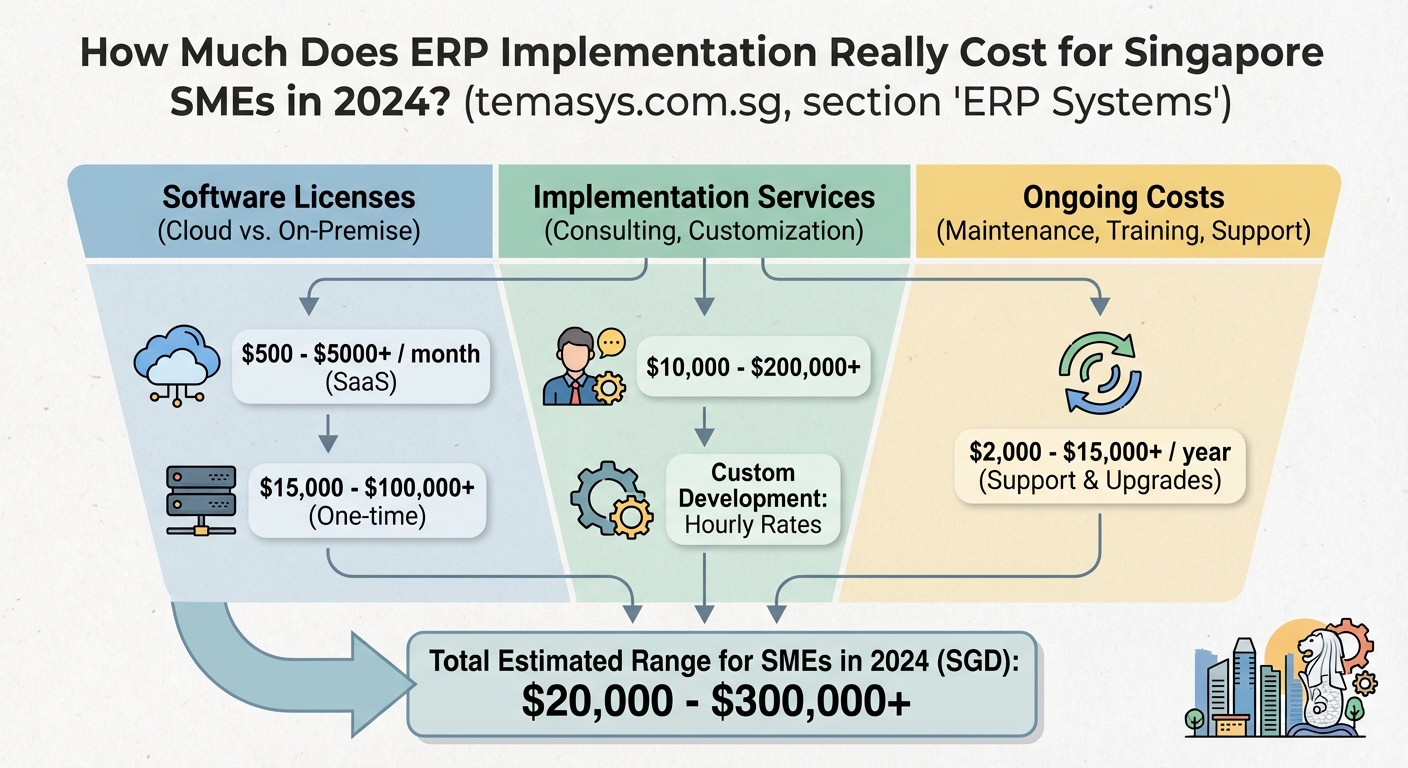
You’ve probably seen the sticker price for software. What you haven’t seen are the hidden costs that triple your budget.
| Cost Category | What Companies Budget For | What They Actually Need |
|---|---|---|
| Software | Annual licence fees | Licences, customisation, integrations |
| Implementation | Basic setup | Data migration, testing, training, consultants |
| Operations | Hosting fees | Support, updates, additional modules, staff time |
| Change Management | Nothing | Internal champions, training materials, process redesign |
The actual costs of ERP implementation include dozens of line items that don’t appear in the initial proposal. Companies that budget only for software and basic setup run out of money before the system goes live.
Choosing technology before understanding processes
Here’s a conversation that happens daily in Singapore offices.
“Our inventory management is a mess. Let’s get an ERP system.”
“Great! Which one?”
“I heard SAP is good. Or maybe Odoo because it’s cheaper.”
Notice what’s missing? Nobody asked how inventory management actually works in the business. Nobody mapped the current process. Nobody identified what needs to change.
You can’t fix broken processes by computerising them. You just get broken processes that run faster.
“Technology is only as good as the process it supports. If you automate a mess, you get an automated mess.” This principle applies whether you’re implementing ERP, CRM, or any other system.
Ignoring employee resistance and capability gaps
Your finance manager has used the same accounting software for 12 years. Your warehouse staff prefer paper checklists. Your sales team think CRM systems create extra work.
Then you announce a complete digital transformation.
What do you think happens?
Resistance isn’t about people being difficult. It’s about fear, habit, and legitimate concerns. When you ignore these human factors, people find creative ways to sabotage your project without openly opposing it.
They enter minimal data. They maintain shadow systems. They complain that the new system doesn’t work. Eventually, management gives up and declares the project a failure.
The capability gap is just as serious. Your team might lack the skills to use new systems effectively. Training budgets get cut first when projects run over budget, leaving employees frustrated and unproductive.
Lacking genuine executive commitment
Every transformation project has an executive sponsor. On paper.
In reality, that sponsor attends the kickoff meeting, then disappears for six months. When conflicts arise between departments, nobody has authority to make decisions. When the project needs additional budget, there’s no champion to fight for it.
Middle managers read the room. If executives don’t actually care about the transformation, why should they?
Real commitment means:
- Attending weekly steering committee meetings
- Making tough decisions about process changes
- Allocating budget for the full project lifecycle
- Holding people accountable for adoption
- Using the new systems yourself
Without this level of involvement, transformation projects drift until they quietly die.
How Singapore’s business environment amplifies these problems
Singapore SMEs face pressures that make transformation even harder.
Talent constraints: You’re competing with MNCs and government agencies for the same small pool of tech talent. The IT manager who should be leading your transformation is fielding three job offers this month.
Cost sensitivity: Operating costs in Singapore are high. When choosing between cloud ERP and on-premise solutions, many companies pick based on upfront cost rather than total cost of ownership.
Speed expectations: Singapore’s business culture values efficiency and speed. This creates pressure to rush implementations, skip proper testing, and launch before teams are ready.
Grant dependency: Government grants are helpful, but they can distort decision-making. Companies sometimes choose solutions that maximise grant eligibility rather than business fit. When the grant runs out, they can’t afford ongoing costs.
A better approach to digital transformation
Here’s how to avoid becoming another failure statistic.
1. Start with business outcomes, not technology
Write down three to five specific business problems you need to solve. Make them measurable.
Examples:
– Reduce inventory carrying costs by 20%
– Cut invoice processing time from five days to one day
– Increase on-time delivery from 78% to 95%
– Eliminate manual data entry for customer orders
Only after you’ve defined these outcomes should you look at technology solutions. The technology exists to serve the business, not the other way around.
2. Map and fix your processes first
Before you buy any software, document how work actually happens today. Not how the procedure manual says it should happen. How it really happens.
Interview the people doing the work. Shadow them for a day. Find the workarounds, the bottlenecks, the steps that don’t add value.
Then redesign the process to eliminate waste and fix problems. Now you’re ready to think about technology that supports the improved process.
3. Budget for the complete transformation
Create a realistic budget that includes:
- Software licences for all users (including future growth)
- Implementation services from experienced consultants
- Data migration and cleaning
- Integration with existing systems
- Comprehensive training for all user groups
- Change management support
- Contingency fund (minimum 20% of total budget)
- Ongoing support and maintenance
If you can’t afford the complete package, scale back your scope. A smaller project done properly beats a large project that fails.
4. Build a change management programme
Technology projects fail because of people, so invest in people.
Your change management programme should include:
- Clear communication about why transformation is happening
- Early involvement of employees in process design
- Identification and empowerment of departmental champions
- Hands-on training (not just watching videos)
- Support resources during the transition period
- Recognition for employees who embrace change
The goal is to make employees partners in transformation, not victims of it.
5. Implement in phases with clear milestones
Big bang implementations rarely work. They create too much disruption and too many variables.
Instead, break the project into manageable phases:
- Foundation phase: Set up core infrastructure, migrate master data, train super users
- Pilot phase: Roll out to one department or location, test thoroughly, fix issues
- Expansion phase: Roll out to additional departments based on lessons learned
- Optimisation phase: Refine processes, add advanced features, measure results
Each phase should have clear success criteria. Don’t move to the next phase until the current one is stable.
6. Choose partners based on fit, not price
The cheapest vendor is rarely the best choice. Neither is the most expensive.
Look for partners who:
- Have experience with Singapore businesses in your industry
- Take time to understand your specific needs
- Provide realistic timelines and budgets
- Offer strong post-implementation support
- Have local presence and resources
Avoiding common mistakes when choosing ERP software can save you from painful and expensive failures down the road.
7. Secure and maintain executive commitment
Your executive sponsor needs to be genuinely involved, not just lending their name.
Set expectations upfront:
- Weekly time commitment required
- Decision-making authority needed
- Budget allocation responsibility
- Personal use of new systems
- Visible support for the project
If an executive can’t commit to these requirements, find a different sponsor or delay the project until you have proper leadership support.
Warning signs your transformation is heading for failure
Watch for these red flags during implementation:
- Scope creep: The project keeps expanding without adjusting timeline or budget
- Declining attendance: Fewer people show up to project meetings each week
- Workaround creation: Users develop manual processes to avoid the new system
- Missed milestones: Deadlines slip repeatedly without consequences
- Vendor finger-pointing: Your implementation partner blames your team and vice versa
- Data quality issues: Nobody takes responsibility for cleaning up master data
- Training shortcuts: Planned training sessions get cancelled or shortened
- Executive absence: Your sponsor hasn’t attended a meeting in a month
If you spot three or more of these signs, stop and reassess. Pushing forward usually makes things worse.
Real success stories from Singapore SMEs
Not every transformation fails. Companies that follow disciplined approaches see real results.
A local trading company spent three months mapping processes before selecting software. They discovered their inventory problems stemmed from poor supplier communication, not system limitations. They fixed the communication process first, then implemented a simpler system than originally planned. Result: 30% reduction in inventory costs and full adoption within six months.
A manufacturing SME took 18 months to complete their ERP implementation, using a phased approach. Slow? Yes. But they achieved 95% user adoption, eliminated their legacy systems completely, and reduced month-end closing from 10 days to three days.
The difference? These companies treated transformation as a business initiative, not an IT project.
Getting your organisation ready for successful transformation
Before you start any digital initiative, prepare your organisation properly.
Ask yourself these questions:
- Do we have clear, measurable business objectives?
- Have we documented and analysed our current processes?
- Do we have realistic budget that covers the full project?
- Is our executive sponsor genuinely committed?
- Do we have internal resources to support the project?
- Are we prepared to change how we work?
If you can’t answer yes to all these questions, you’re not ready. That’s fine. Better to delay and do it right than rush and fail.
Sometimes the smartest move is recognising you’re not ready yet. Understanding whether your business actually needs ERP can prevent you from investing in transformation before you have the foundation to support it.
Making transformation work for your business
Digital transformation doesn’t have to be a gamble.
The companies that succeed are the ones that treat it as a business initiative with technology components, not a technology project with business implications. They invest in planning, people, and process improvement. They set realistic expectations and budgets. They stay committed when things get difficult.
Yes, it takes longer than you want. Yes, it costs more than the initial quote. Yes, it requires hard work from everyone in the organisation.
But the alternative is worse. Failed projects waste money, damage morale, and leave you further behind competitors who got it right.
Start small if you need to. Pick one process, one department, one clear objective. Do that well. Learn from it. Then expand.
That’s how real transformation happens. Not in boardroom presentations, but in daily work that gradually becomes better, faster, and more efficient.
Your business deserves better than becoming another failure statistic. With the right approach, you won’t be.